
How to troubleshoot "... was blocked because this type of file can harm your device." issue with MS Edge
How to show the command line in the Task Manager
How to change file associations in Windows 10 and 11
What is a file whose name starts with ._ prefix?
How to troubleshoot when the thumbnail images of WebP files are not shown on File Explorer
How to open Internet Properties (Internet Options) in Windows 11
How to create a dump file on Task Manager
How to troubleshoot when the context menus do not work correctly in Windows 11 22H2
How to troubleshoot when AppX package installation fails
エラーコードのトラブルシューティング方法 XX-12157
How to install WebView2
How to delete thumbnail caches in File Explorer
Domain names used by Bandisoft
エラーコードのトラブルシューティング方法 XX-12157
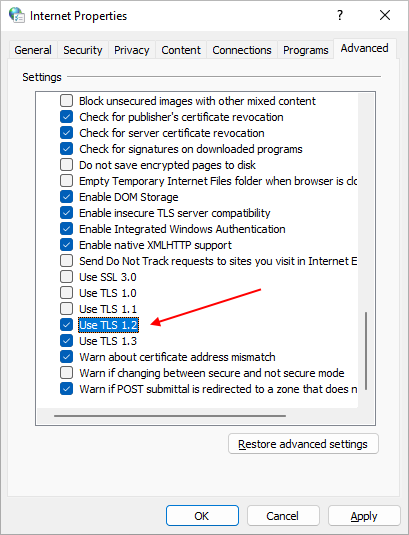
お使いのウェブブラウザが古いバージョンのTLSプロトコルを使用している場合、Bandisoftのソフトウェアをアクティベートする際、または一部の機能を使用する際に問題が発生する可能性があります。 もしエラーコード: 0xbad70006-12157(または12157で終わるその他のエラーコード)がソフトウェアから表示された場合、以下のようにブラウザでTLS 1.2プロトコルを有効にして、再度お試しください。
- インターネットのプロパティ」を開きます。
- 詳細設定」タブを選択します。
- TLS 1.2を使用する を有効にする。